
Running Duiadns on Apple Router
Duiadns has been offering Apple Airport Router Feature (RFC 2136) since day one and will continue to do so, for FREE, only for those accounts created before 01.01.2016. If your free account is created after 1st of January 2016, then you have to upgrade it to a non-free account to use this feature.
An apple router uses Bonjour and DNS Service Discovery that is based on TSIG (Transaction Signature). That means you need a key that can be used with your apple airport router. Let's see how it works.
STEP 1: Login and go to Apple Airport -> Credentials:
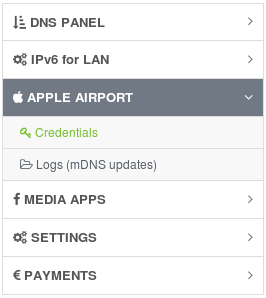
STEP 2: You'll see an apple user, which is in fact TSIG key name. If your apple pass (TSIG key value) is already generated then go to STEP 5. If not, you need to request one, so click on Request by email.

STEP 3: You'll be redirected to our contact form, with all your info already filled out. Just click send message to send us your key request.
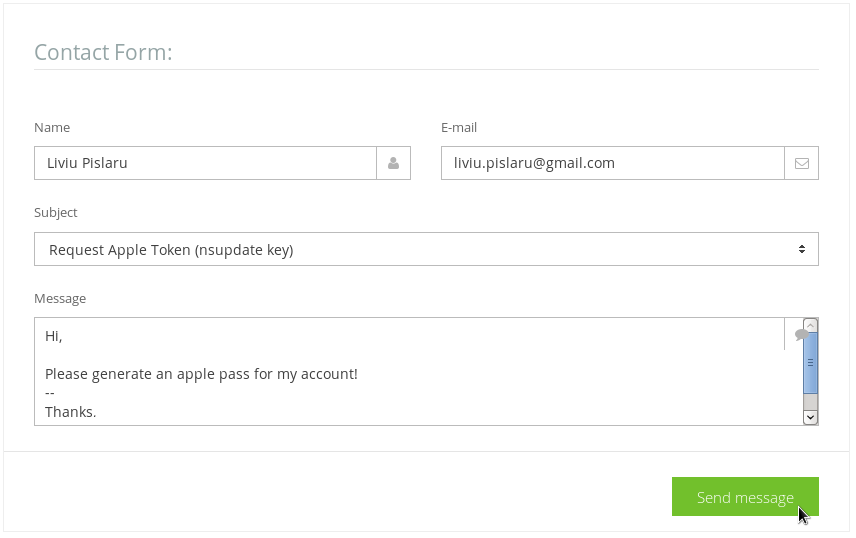
STEP 4: We'll generate your tsig key (apple pass) and come back with an email to you. The key value will be now visible in your Apple Airport / Credentials menu: UPDATE (2017.03.20): You'll have one Apple User for each hostname!!!

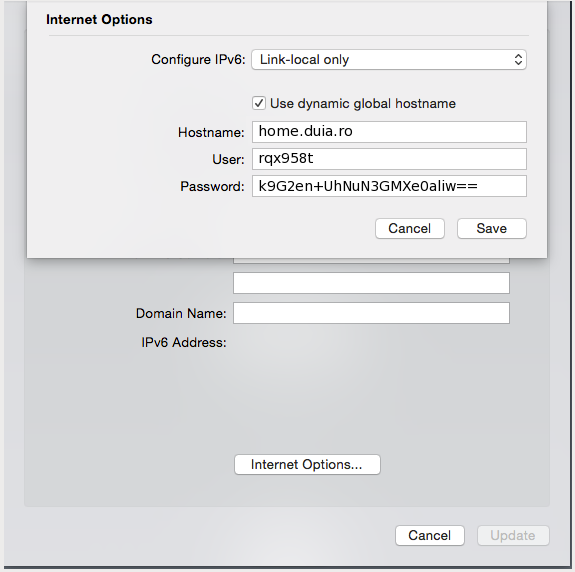
STEP 5: Now is time to use this info on a apple router: (see also the printscreen below)
- Domain name: 'leave blank' (is my case, the default is duia.ro since my hostname is home.duia.ro)
- Hostname: home.duia.ro
- User: rqx958t
- Pass: k9G2en+UhNuN3GMXe0aliw==
Troubleshooting guide:
- 1. Make sure your Apple Airport router is not behind a NAT (network address translation) and has a public ip address. Since it sends the key via UDP, the DNS updates will fail behind NAT!
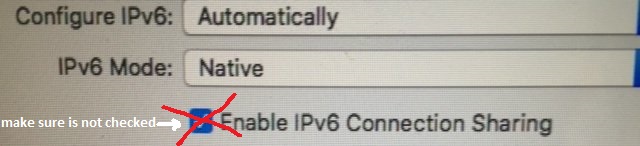
- 2. Make sure you DO NOT HAVE IPv6 Connection Sharing enabled/checked (see the image below).
- 3. Make sure your duiadns account is enabled (you can login on duiadns panel).
- 4. Make sure your apple router's clock is syncronized.
- 5. In very rare situations apple airport router sends mDNS updates unsigned (no TSIG). There is no symptoms on your side for this kind of issue but you'll see no DNS record changes for your hostname. All you need to do is send us an email and we'll fix that easily.
Just to be clear for everybody: You can use IPv6 on your apple router with duiadns. If you have a hostname from a shared domain like duia.us for example, only A, AAAA dns updates will be accepted. If you have your own domain (you can have one for free from freenom.com if you want to test) duiadns will honor all dns updates sent by your apple router: A, AAAA, SRV, PTR, etc.
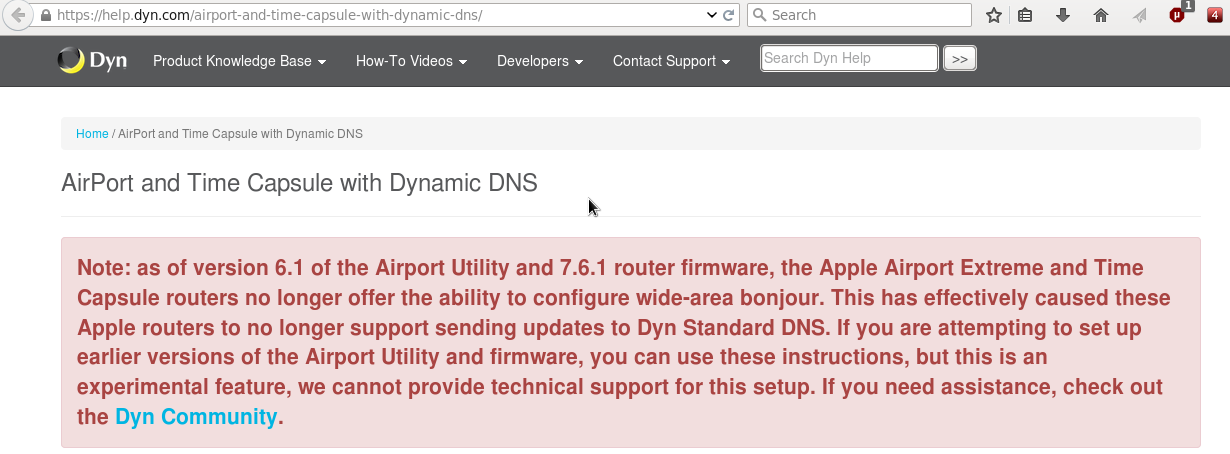
One last thing: Dyn DNS announced on their website that Apple Routers with firmware 7.6.1+ no longer support sending updates to Dyn Standard DNS. This is NOT the case with Duiadns. We support newer firmware versions as well!
For any other information please leave a comment here, drop as an email directly or use our Contact Form
62 Comments

Boris T2015-11-03 15:58:26
Hello and thanks for offering this service.
I have setup my Apple Airport extreme as explained above, but the duiadns control panel says no updates have been received from my router.
The problem is I cannot find a log file either on this website or on my router which could help understand what the issue might be. Would you have any suggestion of how I could go about troubleshooting the problem and finding the rootcause?
Liviu Pislaru2015-11-03 16:08:45
@Boris T: your router is sending malformed mDNS packets and from our experience with other apple airports routers you have "Enable IPv6 Connection Sharing" checked (see the attached picture):
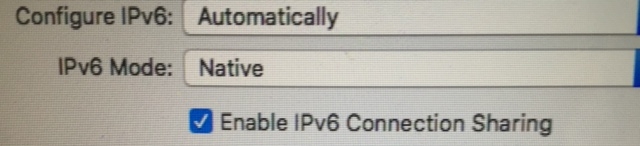
P.S. - You can keep IPv6 enabled if you want but NOT IPv6 Connection Sharing.
Boris T2015-11-03 20:09:45
Thank you so much Liviu, it did fix the issue.
Faisal Munayam2015-11-22 05:19:53
Wow so i have to turn off nat? And manually portforward just to use this?
Liviu Pislaru2015-11-22 05:47:07
@Faisal: I think you misunderstood, you don't have to disable NAT on your apple router.
If your apple router is behind another router (meaning it has a private ipv4 address on wan/uplink interface) is not going to work, because the uplink router is doing NAT for apple router. If this is the case, you should use that router (the one in front of your apple router) in bridge mode or get rid of it completely. This is a rare situation though.
Faisal Munayam2015-11-22 12:05:40
@Liviu thanks for the update, however i am still having issues with it updating my ip, i even changed ipv6 to local link only as shown on your images & unchecked ipv6 sharing, any suggestions?
Liviu Pislaru2015-11-22 12:51:44
@Faisal: You don't have to disable IPv6. Just make sure you've unchecked "IPv6 sharing" and then reboot the router (mandatory).
Faisal Munayam2015-11-22 14:17:37
@Liviu thank you i think the reboot sorted it :)
Faisal Munayam2015-11-27 20:56:27
@Liviu, i also have an airport express acting as a repeater for my network, do i need to adjust any settings in that? such as ipv6 sharing or the global hostname on the repeater?
Faisal Munayam2015-11-28 13:39:01
@Liviu also what if also wanted to use ipv6 internet sharing in the future? eventually ipv4 support will end
Liviu Pislaru2015-11-28 17:58:53
@Failsal: As i said before, you can use IPv6 but not IPv6 sharing. I think there's a bug in the firmware that will be fixed before IPv4 depletion.
Faisal Munayam2015-11-28 20:23:52
Thanks for all your support, such a great service :)
Sooraj Chettada2016-03-27 10:54:32
Hi, I configured as said the steps and the ipv6 sharing is disabled. but i still dont see any mdns updates for the hostname. can you look into this?
Liviu Pislaru2016-03-27 20:06:02
@Sooraj: fixed!
Stuart Mao2016-04-21 13:05:39
Hi, I configured my airport as above, but it still does not work.
Liviu Pislaru2016-04-21 23:26:16
@Stuart Mao: can you plese check again. everything seems to work just fine from our logs.
Narahari Patro2016-05-08 05:23:00
Hi, I have configured my router as per the steps above and enabled port mapping. But I am unable to connect to my home network remotely. Please look into this and suggest any troubleshooting steps if needed..
Liviu Pislaru2016-05-08 09:51:25
@ Narahari Patro: it should be ok now. can you please check again?
Marius Lazarescu2016-05-15 02:39:50
Liviu, I have configured the router as mentioned (IPv6: local link only), reset it twice but I'm still getting this message:
INFO: No Apple Airport mDNS updates for the last 30 days!
I'm connected via PPPoE (RDS Fiberlink).
Please advise.
thank you
Liviu Pislaru2016-05-15 07:57:35
@Marius: you're router doesn't send signed mDNS updates. we've just applied a fix for your account and it should be ok now.
Marius Lazarescu2016-05-15 11:45:35
@Liviu: I'm still getting "INFO: No Apple Airport mDNS updates for the last 30 days!"
Slaveanu Ionut2016-05-15 12:30:20
@Marius: Your last update was at 3 am. So as soon as your router send a new update it should be updated also in duia account. You could try to restart your router to force an update or wait until it decide to do that.
Marius Lazarescu2016-05-15 15:12:13
@Ionut: now it seems its working, thank you for your help
Jinsix Bai2016-07-25 18:21:19
Final i managed my airport extreme showed up dynamic hostname checked (by turn off ipv6 setting on my airport express repeater ), but i've got no ip update at all. PLS help.
Liviu Pislaru2016-07-25 19:50:55
@Jinsix: everything looks fine on your side except the fact that your apple router doesn't send any A updates yet (only SRV). you can wait or you can reboot the router to make it send mDNS with A records.
Youxin Chen2016-08-15 17:18:27
Does anyone know if this works with an OS X system?
On OS X if you go to System Preference -> Sharing, then click "Edit..." on the top, there'll be a similar panel to the one in AirPort Utility. I was wondering if I can set up 2 domains, one for my AEBS, and one for my MacBook, and use the same credential but different hostname.
Liviu Pislaru2016-08-15 18:16:38
@Youxin Chen: You can use different hostnames on different apple routers or OS X systems with the same credentials. Nevertheless, we do not recommend to use your apple credentials on OS X but one of our duiadns clients that works for OS X, scheduled to run every 5 minute: https://www.duiadns.net/download-macos
The main reason we do not recommend apple credentials on OS X is that the system sends a lot of 'other' mDNS information like SRV, TXT, etc. and that makes more sense with your own domain.
So, in your specific case:
1. use a hostname on your AEBS with apple credentials.
2. use another hostname on your MacBook, with a duiadns client and your MD5 passowd (Settings -> Account Info -> MD5 Pass)
Jess Fong2016-08-31 17:59:05
Hi, I created 2 host names for 2 apple airport routers, and I set up the mdns as instructed, the host name with AirPort Extreme is working, the other with airport express is not working, can you please check?
Liviu Pislaru2016-08-31 21:56:20
@Jess Fong: I've just checked and both your hostnames have updated from apple routers. Do you still have the issue with the airport express?
Jamie Downs2016-09-24 12:41:19
Hi. I have my own domain and I've redirected the domain to your name servers.
Can you please give me an example of what I should enter into my Airport Extreme router for
Domain Name and Hostname.
Thanks
Liviu Pislaru2016-09-24 13:24:57
@Jamie Downs: Hi. I've just sent you all details on email.
Simon Thomson2017-01-05 11:56:35
Hi, I have followed the guide for the airport but I can't access :-( Do I need to forward a port or something?
Thanks
Simon
Liviu Pislaru2017-01-05 12:10:02
@Simon Thomson: From what i see in your log files your airport router send mDNS updates for host argoprint.duia.us just fine. You can also see that from your account: Apple Airport -> Logs (mDNS updates). What exactly is your problem, could you be more specific?
Simon Thomson2017-01-05 12:59:50
@Liviu Pislaru when I enter my host name in browser it timeouts and there is no connection made
Thanks
Simon
Liviu Pislaru2017-01-05 14:15:18
@Simon: Duiadns is taking care of the mapping between your hostname and the ip address of the airport router. If you cannot remotely connect to your router when using your hostname in a browser but the hostname is pointing to the right ip address of your router then the issue is someplace else. Are you sure the remote access is granted on your router or the webserver is up&running or the port forwarding is in place if you want to hit a specific device from your LAN?
Simon Thomson2017-01-06 07:34:29
@Liviu Pislaru - thanks! I forgot to activate remote access on the router.
Cheers
Laurence Cope2017-01-09 00:39:12
Hi. I have also followed the guide and get "INFO: No Apple Airport mDNS updates for the last 30 days!". I have restarted my airport extreme a few times.
I am on the trial version for Personal+ will it work on that?
Thanks
Laurence Cope2017-01-09 00:43:02
Ah its OK its working! I didn't enter my hostname and copied yours from the instructions. Doh! Works with my own hostname.
Nicholas Laham2017-01-20 22:28:19
This is great, thanks! Is there a way I can map my own domain to my duia hostname? Do I point an A record to my duia hostname, just like I would an IP address? I assume if that is the way, I should be able to connect through my own hostname.
Nicholas Laham2017-01-20 23:02:38
Well, I tried to setup an A record with my domain host, but it appears you can only use IP address on A records, not a hostname, so I used CNAME which I just learned is for mapping a name to a name.
And it worked! I can now use VNC and other types of connections using my own domain name, even with a dynamic IP address.
Also, I'm using an older (non-802.11ac) AEBS (the flat one). I assume this all works the same with the newer tower models? I am thinking about upgrading.
Liviu Pislaru2017-01-23 16:50:46
@Nicholas Laham: there are two ways to use your own domain with duiadns on your apple router:
1. register a "duia custom (plus)" account using your own domain (mydomain.com) or use only a specific subdomain with duiadns like (apple.mydomain.com).
2. use a "duia personal plus" account and a duiadns shared domain (laham.duia.us for example) on your apple router, then create a CNAME on your own zone (mydomain.com), for example apple.mydomain.com, that points out to laham.duia.us configured on your router. As far as i see you've already used this method.
If you need any more info just let us know.
Nicholas Laham2017-01-23 17:51:56
Well, I tried to setup an A record with my domain host, but it appears you can only use IP address on A records, not a hostname, so I used CNAME which I just learned is for mapping a name to a name.
And it worked! I can now use VNC and other types of connections using my own domain name, even with a dynamic IP address.
Also, I'm using an older (non-802.11ac) AEBS (the flat one). I assume this all works the same with the newer tower models? I am thinking about upgrading.
Bill Gates2017-08-08 19:50:08
@Liviu Pislaru
Thank you. I followed your guide and everything seems to be working fine. I can see my network and do what I wanted. I've been struggling with other DDNS systems that require a computer to be running all the time. Now, I don't have to worry about it, since the Apple router does all the work and is on all the time.
Thanks a bunch.
Liviu Pislaru2017-08-09 10:04:38
@Bill Gates: Thanks Bill for your feedback!
Robin Van Doorn2018-01-12 08:06:13
Worked like a charm!
r w z2018-01-12 08:22:42
How often does the airport update duiadns?
Liviu Pislaru2018-01-12 13:56:29
@Robin Van Doorn2018: thanks for your feedback!
@rwz: usually very often, many times a day. you can get this information from the duiadns menu: APPLE AIRPORT -> Logs (mDNS updates).
Ramón Figueroa-centeno2018-01-29 19:57:58
Aloha, My subscription lapsed and I paid yesterday to renew it. When I check if my apple router has updated I get "INFO: No Apple Airport mDNS updates for the last 7 days!". It used to work. Please help.
Liviu Pislaru2018-01-29 23:11:07
@Ramon: I sent you a mail reply yesterday telling you that your router is putting "\032" in front of your real token and you should change that. Did you check it?
Christopher Nofal2018-04-21 01:20:19
Is is still necessary to disable IPv6 Connection Sharing? If so, how do all the clients behind the router get IPv6 addresses?
Liviu Pislaru2018-04-21 10:42:58
@Christopher: As far as i know apple airport still doesn't support DHCPv6 PD so IPv6 behind the router is still a challenge rather you use dynamic dns or not. If you want to make a test with IPv6 sharing checked we are willing to assist you.
Richard Kellogg2018-09-22 22:51:11
I believe I have trouble with port forwarding on my AirPort Extreme. Here is my log:
Configure these under airport/internet/internet options/use dynamic global host name
and reset theonet
Rockweed:~ kellogg$ nslookup rockweed.kellogg.duia.us
Server: 10.0.1.1
Address: 10.0.1.1#53
Non-authoritative answer:
Name: rockweed.kellogg.duia.us
Address: 98.11.143.132 (this is in fact the airport (theonet) IP address)
- hmmm... this is not working yet:
ssh: connect to host rockweed.kellogg.duia.us port 22: Network is unreachable
Rockweed:~ kellogg$ ping rockweed.kellogg.duia.us
PING rockweed.kellogg.duia.us (98.11.143.132): 56 data bytes
Request timeout for icmp_seq 0
Request timeout for icmp_seq 1
Request timeout for icmp_seq 2
Request timeout for icmp_seq 3
Request timeout for icmp_seq 4
36 bytes from mta-98-11-143-132.stny.rr.com (98.11.143.132): Destination Host Unreachable
- look at duiadns log:
2018-09-22 18:57:26 GMT rockweed.kellogg.duia.us 98.11.143.132 add (this is theonet address)
- change DCHP range from 10.0.1.2-10.0.1.200 to 10.0.1.3-10.0.1.200
and give rockweed the "Using DHC with manual address" = 10.0.1.2
after theonet restart, this seems to have taken, and rockweed has internet
- check that theonet Network options specify enable default host at 10.0.1.2, NAT port mapping is enabled
and add Port settings, Remote login - SSH:
public TCP ports: 22
private IP Address: 10.0.1.2
private TCP ports: 22
- still cannot ssh to rockweed.kellogg.duia.us
- add Apple Remote Desktop ports to theonet Port Settings and restart theonet
- cannot connect from macdehavilland via vnc://rockweed.kellogg.duia.us
Liviu Pislaru2018-09-23 09:51:25
@Richard Kellogg: I want to make sure you undestand this portforwarding issue has nothing to do with the dynamic dns provider, in this case duiadns. As far as i see in our logs, your apple router in sending DNS updates just fine and your hostname rockweed.kellogg.duia.us is pointing to 98.11.143.132, which i suppose is the correct ip address of your router. Is the SSH port open on your LAN device, can you access 10.0.1.2 via SSH from your LAN?
Here's something that has nothing to do with port forwarding issue but might help you and others in the future:
I suggest not to use subdomains like prefix1.prefix2.duia.us but prefix.duia.us on your apple routers (and especially macbooks). So instead of using rockweed.kellogg.duia.us i suggest you to use kellogg.duia.us or any other hostname like prefix.duia.us on your router. It has something to do with the way apple treats 4 words subdomains on macbook laptops:
prefix1.prefix2.duia.us - works with bonjour on apple routers BUT NOT on laptops (macos)
prefix.duia.us - works with bonjour on BOTH apple routers and laptops (macos)
Ricardo Pedrosa2019-04-07 13:18:49
Does the apple airport mDNS feature work with a custom domain?
Liviu Pislaru2019-04-08 10:10:56
@Ricardo: Yes it does! More than that, if you have your own domain your apple router will also send updates for TXT, SRV, PTR records along with A and AAAA.
Keep in mind that if you want to test your own domain on an apple router, with duiadns, you need to change your nameservers on registrar's panel to ns1.duiadns.net & ns2.duiadns.net first.
R M2020-04-18 18:00:41
Hi Liviu, I have configured the router as mentioned (IPv6: local link only), reset it but I\'m still getting this message "No Apple Airport mDNS updates for the last 7 days!".
I\'m connected via PPPoE.
Please advise.
Thanks
Liviu Pislaru2020-04-18 19:02:09
@R M: in order to investigate further, we need your IP address so let\'s move this debug to email and we\'ll come back here with the solution to help the others.
Gleb Miller2020-07-26 22:39:04
Hello. I have trouble enabling dynamic dns on my AirPort Extreme. The checkbox always turns off after a router restarts. And logs on your site don’t show my router.
Slaveanu Ionut2020-07-27 12:15:26
@Gleb Miller: Let\'s move this debug discussion to email. I have already mailed you with the necessary steps.
tim lensen2020-09-02 12:00:52
Hi!
i am missing something in my setup, but I cant figure it out.
I am running pivpn, setup the rules in my router, and added a profile on my iphone. Iphone connects to the profile, but doesnt provide any internet...
Any help would be appreciated.
tim lensen2020-09-02 13:11:06
Hi!
i am missing something in my setup, but I cant figure it out.
I am running pivpn, setup the rules in my router, and added a profile on my iphone. Iphone connects to the profile, but doesnt provide any internet...
Any help would be appreciated.
Slaveanu Ionut2020-09-02 16:41:43
@tim lensen: If you want to route all traffic through vpn you can configure it like in this post:
https://github.com/pivpn/pivpn/issues/242
Config Tutorials
Recent Comments
Contente Publisher on Telegram Notification
Contente Publisher on Telegram Notification
Slaveanu Ionut on Running Duiadns on Apple Router
tim lensen on Running Duiadns on Apple Router
tim lensen on Running Duiadns on Apple Router
Slaveanu Ionut on Running Duiadns on Apple Router
Gleb Miller on Running Duiadns on Apple Router
Leave a Comment